辅助方法(Helpers)
以下是 Edge 模板中全局可用辅助方法的列表。
html.classNames
html.classNames 辅助方法用于将一组类序列化为字符串。该数组可以包含字符串,或带有条件类的对象。例如:
<input class="{{
  html.classNames([
    'input',
    {
      'input-error': false,
      'input-disabled': true,
      'input-large': size === 'large',
      'input-medium': size === 'medium',
      'input-rounded': true
    },
  ])
}}" />
假设 size 的值为 medium,得出的 HTML 输出如下。
<input class="input input-disabled input-medium input-rounded" />
html.attrs
html.attrs 辅助方法将对象转换为 HTML 属性。例如:
<input {{
  html.attrs({
    id: 'name',
    placeholder: 'Enter your name',
    value: user.name
  })
}} />
假设 user.name 的值为 null,得出的 HTML 输出如下。
<input id="name" placeholder="Enter your name" />
属性对象的值必须是 string、boolean,或 string 数组。如果值为 undefined、null、false 或 空字符串,该属性将从输出中移除。
| 值 | 序列化输出 |
|---|---|
string | 原样序列化到输出中 |
string[] | 数组值根据属性不同,以 comma(逗号)或 space(空格)拼接。 |
false | 该属性将从序列化输出中移除。对于 null 和 undefined 值也采用相同行为。 |
true | 取决于属性,要么将值序列化为字符串,要么只定义该属性 |
序列化 class 属性
html.attrs 方法对 class 属性给予了特别关注。class 属性的值可以是字符串、字符串数组或对象。
在底层,html.classNames 方法被用于序列化 class 属性。
<input {{
  html.attrs({
    class: [
      'input',
      'input-large',
      {
        'input-error': hasError,
      },
    ]
  })
}} />
输出
<!-- hasError = false -->
<input class="input input-large" />

<!-- hasError = true -->
<input class="input input-large input-error" />
nl2br
将换行符转换为 HTML <br /> 标签。由于 nl2br 辅助方法返回的是 HTML 字符串(带有换行标签),你必须使用三重花括号才能原样渲染该 HTML。
{{{ nl2br(post.content) }}}
如果你想转义传入 nl2br 方法的内容,可以将其包裹在 html.escape 方法中。
在下面的示例中,<br /> 标签不会被转义,但 post.content 会被转义。
{{{
  nl2br(
    html.escape(post.content)
  )
}}}
html.escape
转义字符串值中的 HTML。双花括号已经会对值进行转义,因此只有在你使用三重花括号时才需要使用此方法。
{{{ html.escape(post.content) }}}
truncate
将字符串值截断到给定的字符数。例如:
{{
  truncate(
    'This is a very long sentence that i would like to be shortened',
    18
  )
}}

<!-- Output: This is a very long... -->
truncate 方法不会把中间的单词截断,而是会让其完整显示。不过,你可以通过禁用 completeWords 选项来关闭这一行为。
{{
  truncate(
    'This is a very long sentence that i would like to be shortened',
    18,
    { completeWords: false }
  )
}}

<!-- Output: This is a very lon... -->
此外,你还可以为截断后的字符串定义自定义后缀。
{{
  truncate(
    'This is a very long sentence that i would like to be shortened',
    18,
    { suffix: ' [Read more]' }
  )
}}

<!-- Output: This is a very long [Read more] -->
excerpt
excerpt 方法与 truncate 方法类似。但该方法会先移除 HTML 标签,再截断字符串并返回纯文本。因此,如果你希望从 HTML 内容中生成摘要,它更为合适。
{{
  excerpt(
    '<p> Hello, this is a dummy <strong> post </strong> </p>',
    20
  )
}}

<!-- Output: Hello, this is a dummy... -->
你可以禁用 completeWords 选项来执行严格的截断。
{{
  excerpt(
    '<p> Hello, this is a dummy <strong> post </strong> </p>',
    20,
    { completeWords: false }
  )
}}

<!-- Output: Hello, this is a du... -->
最后,你也可以提供一个要使用的 suffix。
{{
  excerpt(
    '<p> Hello, this is a dummy <strong> post </strong> </p>',
    20,
    { suffix: ' [Read more]' }
  )
}}

<!-- Output: Hello, this is a dummy [Read more] -->
inspect
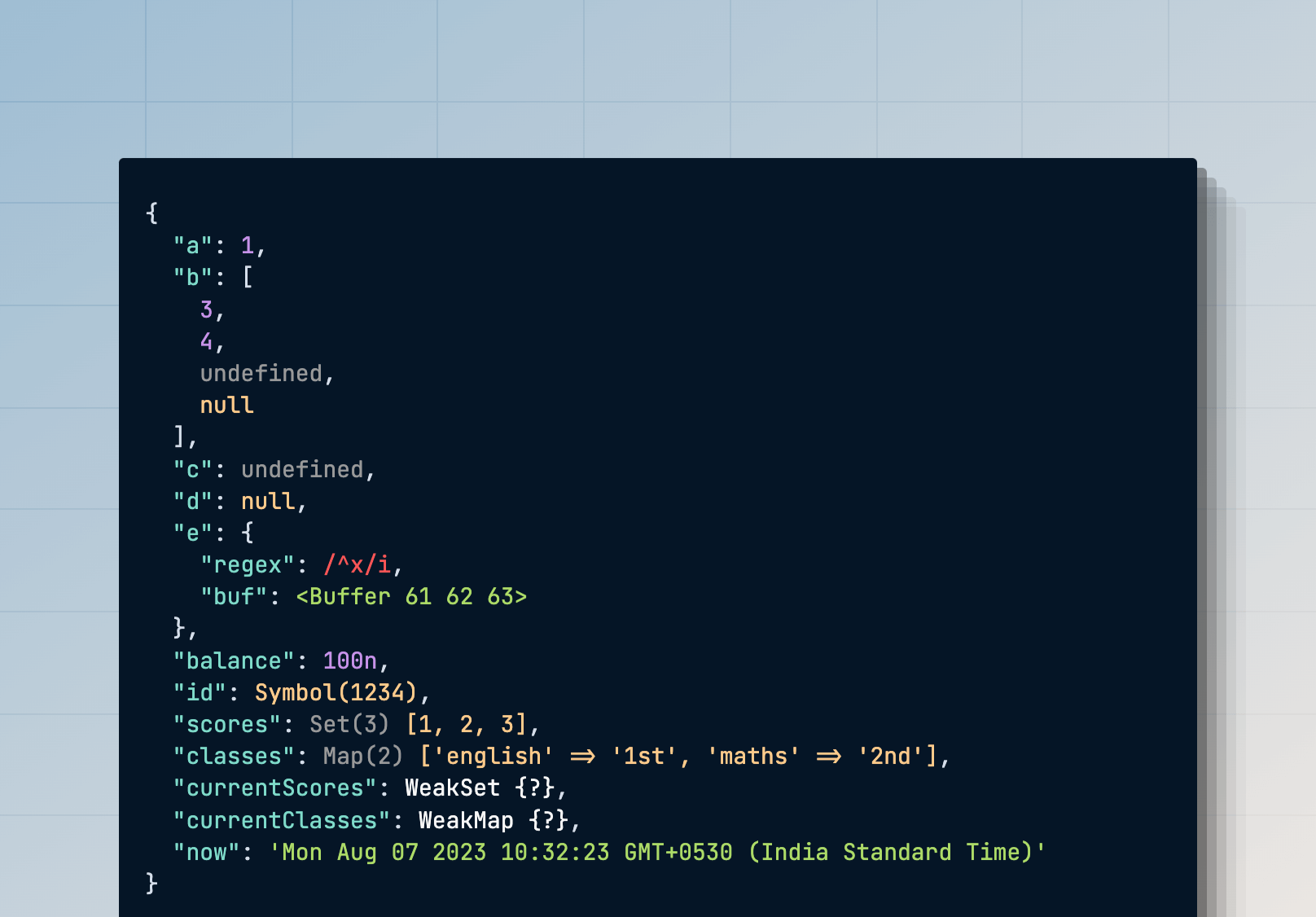
你可以使用 inspect 方法来美观地打印某个值以进行调试。inspect 辅助方法返回 HTML,你必须在浏览器中查看以获得更好的可读性。
{{
  inspect({
    a: 1,
    b: [3, 4, undefined, null],
    c: undefined,
    d: null,
    e: {
      regex: /^x/i,
      buf: Buffer.from('abc'),
    },
    balance: BigInt(100),
    id: Symbol('1234'),
    scores: new Set([1, 2, 3]),
    classes: new Map([['english', '1st'], ['maths', '2nd']]),
    currentScores: new WeakSet([[1, 2, 3]]),
    currentClasses: new WeakMap([[['english', '1st'], ['maths', '2nd']]]),
    now: new Date()
  })
}}
输出
转换大小写
你可以使用以下方法之一来转换字符串的大小写。
{{ camelCase('hello-world') }}     // Output: helloWorld
{{ snakeCase('hello-world') }}     // Output: hello_world
{{ dashCase('HelloWorld') }}       // Output: hello-world
{{ pascalCase('hello-world') }}    // Output: HelloWorld
{{ capitalCase('hello-world') }}   // Output: Hello-World
{{ sentenceCase('hello-world') }}  // Output: Hello world
{{ dotCase('hello-world') }}       // Output: hello.world
{{ noCase('hello-world') }}        // Output: hello world
{{ titleCase('hello-world') }}     // Output: Hello-World